
Open a Lead Miner results file: clean, sorted email addresses for your target customers in your field and country. Then look at an address like contact@ and ask yourself: who owns the company? In which city? Does it have a phone number or a Facebook page?
The address alone opens the door. But you write a better message when you know who's standing behind it.
1. Why I built a second tool
Maybe you've tried this yourself: you take an address from your list, open the company's website, look for the contact page, then for the manager's name, then for the phone number. Ten minutes for a single address, and a hundred addresses in the list.
On September 25 I started Data Booster: it takes the addresses Lead Miner found, and looks up the public information about the company for each one. Since that day I've added 215 changes to it in the project log.
2. What does Data Booster add to each address?
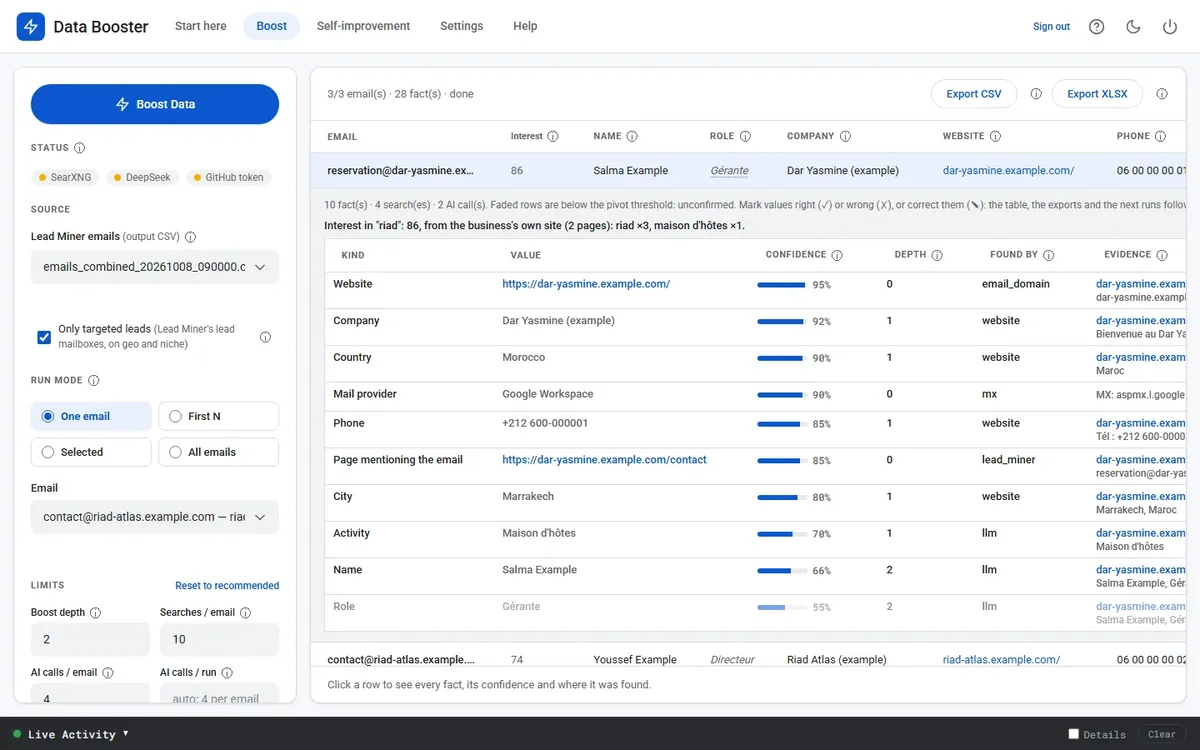
- Company information: the company name, the contact person's name and role, the website, the business phone, the city and address, the social media pages, and registration numbers like ICE or RC.
- A source and a confidence score for every piece of information: you open the details and see where the information came from and the text it was taken from.
- An AI check: it hides values that belong to another company, and puts a "to check" mark on values it couldn't confirm.
- Interest score: from 0 to 100, based on your field's keywords on the company's website. You sort the table by it and start with the customers closest to you.
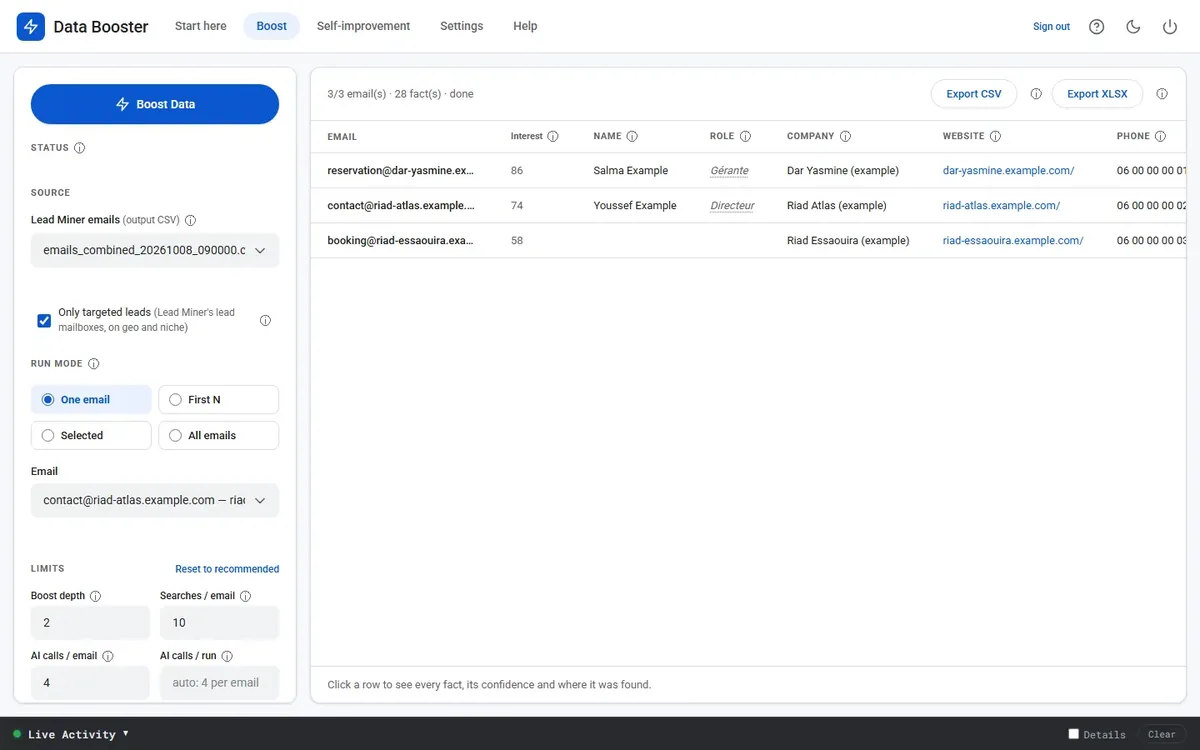
At the end you export a CSV file with one line per address, or an XLSX file with two sheets: customers and information.
3. The Interest score moment
On October 7 I added the Interest score. The next day I ran both tools together on a real search, the way any customer will, and found that customers whose names are Arabic words didn't get a score. I fixed it in version 0.2.21 the same day.
I learned from that day to try the two tools together, the way my customer will use them.
Know who you're writing to before you write.
4. Limits you should know before buying
- Both apps run on Windows 10 or 11, and their screens are in English, with guides and videos in Arabic.
- Data Booster needs about 10 to 30 seconds per address, and doesn't run while Lead Miner is searching.
- Without an AI key it works, but finds fewer names and roles. And the AI provider bills you directly.
- The information comes from public sources, and may be wrong or out of date. That's why you see the source and confidence score of each piece of information.
- Business contacts only: no leaked data, home addresses, ID numbers or birth dates.
💳 Price and purchase
The bundle: Lead Miner + Data Booster for $149 a year
Instead of $196 if you buy each one separately (99 + 97).
- Both Windows apps, with their updates, set up to work together
- One license key for both apps, for two computers at most
- Beginner's guides and tutorial videos
Your key and download links arrive by email within minutes of payment. You can cancel whenever you like, and both apps keep working until the end of the paid year.
Get your copy now from Gumroad 🚀
Already have Lead Miner? Add Data Booster alone for $97 a year
Prefer to pay in cash or by bank transfer? Message me on WhatsApp
And you, what's the first piece of information you look for before writing to a target customer you don't know? Write to me in the comments.
Comments
Comments
Post a Comment